Tugas 5: Implementasi Tree
Berikut adalah tugas praktikum untuk memahami cara kerja struktur data Tree (General Tree) melalui implementasi manual menggunakan bahasa Java.
1. Tujuan Penugasan
- Mahasiswa mampu memahami proses insertion (penambahan node) pada struktur Tree.
- Mahasiswa mampu memahami proses deletion (penghapusan node) pada struktur Tree.
- Mahasiswa mampu mengamati perubahan struktur tree melalui traversal.
2. Pilihan Struktur Data
General Tree dengan ArrayList sebagai penyimpan children node.
3. Ketentuan Pengerjaan
- Gunakan kode dasar yang telah diberikan.
- Praktikan hanya perlu melengkapi bagian insertion dan deletion di method
main(). - Tidak perlu membuat struktur baru (class
Nodesudah disediakan). - Setiap proses wajib diberi komentar penjelasan singkat.
- Program harus bisa dijalankan (compile & run tanpa error).
- Gunakan traversal untuk membuktikan perubahan struktur.
4. Kode Dasar (Template)
Salin kode berikut sebagai titik awal pengerjaan:
import java.util.ArrayList;

class Node {
    int data;
    ArrayList<Node> childrenNode = new ArrayList<>();

    Node(int data) {
        this.data = data;
    }

    public void insert(Node new_node) {
        childrenNode.add(new_node);
    }

    public void remove_with_index(int index) {
        if (index < 0 || index >= childrenNode.size()) {
            System.out.println("Child node dengan index " + index + " dari parent node '" + this.data + "' tidak ditemukan di dalam range index 0 - " + childrenNode.size());
            return;
        }

        childrenNode.remove(index);
        System.out.println("Child node dari parent node '" + this.data + "' dengan index " + index + " berhasil dihapus");
    }

    private void _traversal(Node node, int depth) {
        for (int i = 0; i < depth; i++) {
            System.out.print("---");
        }
        System.out.println("> " + node.data);

        for (Node child : node.childrenNode) {
            _traversal(child, depth + 1);
        }
    }

    public void traversal() {
        _traversal(this, 0);
    }

    private void _post_traversal(Node node, int depth) {
        for (Node child : node.childrenNode) {
            _post_traversal(child, depth + 1);
        }
        for (int i = 0; i < depth; i++) {
            System.out.print("---");
        }
        System.out.println("> " + node.data);
    }

    public void post_traversal() {
        _post_traversal(this, 0);
    }
}

public class KELAS_SDA_NO-PRAKTIKUM_NIM_NAMA {
    public static void main(String[] args) {
        Node root   = new Node(99);
        Node Node_1 = new Node(1);
        Node Node_2 = new Node(2);
        Node Node_3 = new Node(3);
        Node Node_4 = new Node(4);
        Node Node_5 = new Node(5);
        Node Node_6 = new Node(6);
        Node Node_7 = new Node(7);
        Node Node_8 = new Node(8);
        Node Node_9 = new Node(9);
        Node Node_10 = new Node(10);
        Node Node_11 = new Node(11);
        Node Node_12 = new Node(12);
        Node Node_13 = new Node(13);
        Node Node_14 = new Node(14);
        Node Node_15 = new Node(15);

        // kerjakan insertion disini beserta komentar penjelasannya

        root.traversal();

        System.out.println("");

        // kerjakan deletion disini beserta komentar penjelasannya

        System.out.println("");

        root.traversal();
    }
}
5. Instruksi Pengerjaan
Operasi Insertion (Penambahan Node)
Buat struktur tree sesuai gambar acuan yang diberikan, dengan ketentuan:
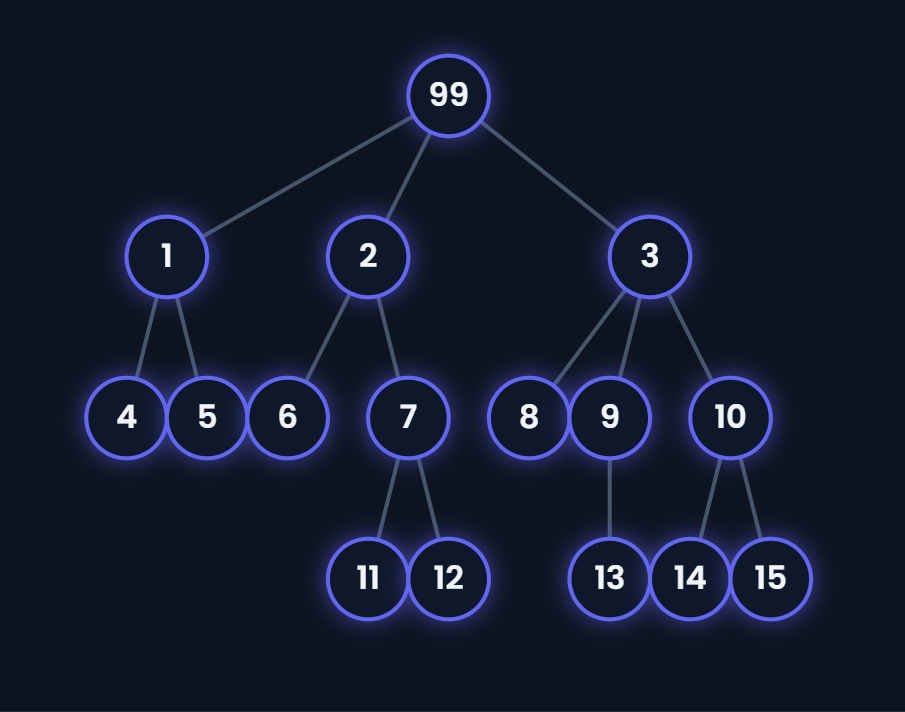
- Root:
99 - Level berikutnya:
99 → 1, 2, 3, …, 15 - Lanjutkan hingga semua node (1–15) terbentuk sesuai struktur
Gunakan method insert(Node new_node) dan beri komentar pada setiap baris. Contoh:
root.insert(Node_1); // Menambahkan node 1 sebagai child dari root (99)
Operasi Deletion (Penghapusan Node)
Lakukan dua penghapusan berikut menggunakan method remove_with_index(index):
- Hapus Node 4 — Node 4 adalah child dari Node 1, tentukan index yang sesuai.
- Hapus Node 10 — Node 10 adalah child dari Node 3.
Beri komentar pada setiap baris. Contoh:
Node_1.remove_with_index(0); // Menghapus node 4 dari child Node 1
6. Bobot Penilaian
| No | Kriteria Penilaian | Bobot |
|---|---|---|
| 1 | Ketepatan struktur tree hasil insertion (sesuai gambar acuan) | 35% |
| 2 | Ketepatan deletion (index benar, node yang terhapus sesuai) | 30% |
| 3 | Logika program berjalan tanpa error (compile & run) | 20% |
| 4 | Kerapian kode dan kelengkapan komentar penjelasan | 15% |
7. Ketentuan Pengumpulan
- File yang dikumpulkan:
- Source code
.javayang telah dilengkapi. - Screenshot hasil program dijalankan (jika lebih dari 1 foto, gabungkan dalam format
.pdf).
- Source code
- Tidak perlu membuat laporan.
- Kode wajib memiliki komentar yang jelas sesuai ketentuan.
- Gunakan penamaan node yang sudah disediakan (
Node_1,Node_2, dst.). - Tidak boleh mengubah struktur class
Node.
Format nama file:
Source code  : KELAS_SDA_NO-PRAKTIKUM_NIM_NAMA.java
Dokumentasi  : KELAS_SDA_NO-PRAKTIKUM_NIM_NAMA.png  /  .pdf